

Setup Local Development Environment
You have a project in the Cockpit and you are ready to build something. This guide walks you through setting up a local development environment so you can create and test a custom Laioutr app on your own machine.
Prerequisites
Make sure you have these tools installed before you begin:
- Node.js >= 22.12
- pnpm
- Laioutr CLI
- A Laioutr project created in the Cockpit
Setup
Clone the App Starter
Grab the official App Starter template to get a pre-configured project structure with playgrounds, Laioutr registration, and conventions already in place.
npx giget@latest gh:laioutr/app-starter
cd laioutr-app-starter
You do not have to use the template, but it gives you a solid starting point. See the App Starter docs for a full breakdown of the project structure.
Configure the NPM access token
Laioutr packages are hosted on a private registry. Before you can install dependencies you need to provide an NPM access token.
- Copy the
.npmrc.configfile to.npmrc. - Open
.npmrcand replace the placeholderNPM_LAIOUTR_TOKENwith your actual token. You can find the token in project settings in the Cockpit.
For convenience you can do this from the terminal:
cp .npmrc.config .npmrc
Then open .npmrc in your editor and replace NPM_LAIOUTR_TOKEN with the token value. Alternatively, use sed:
# macOS
NPM_LAIOUTR_TOKEN=laioutr_npm_abc123yourtoken
sed -i '' "s|NPM_LAIOUTR_TOKEN|$NPM_LAIOUTR_TOKEN|g" .npmrc

# Linux
NPM_LAIOUTR_TOKEN=laioutr_npm_abc123yourtoken
sed -i "s|NPM_LAIOUTR_TOKEN|$NPM_LAIOUTR_TOKEN|g" .npmrc
pnpm install will fail with ERR_PNPM_FETCH_403. Double-check that the token is pasted correctly and that there are no extra spaces or line breaks around it.Install dependencies
pnpm install
Fetch the project configuration
The laioutrrc.json file is a complete snapshot of your project's frontend configuration: pages, sections, field values, and app settings. It is generated from Studio and used for both local development and production builds.
Fetch it with the Laioutr CLI:
laioutr rc fetch -p <organization-slug>/<project-slug> -s <project-secret>
- Replace
<organization-slug>/<project-slug>with your project identifier (e.g.acme/storefront). - Replace
<project-secret>with the project secret from project settings in the Cockpit.
Start a playground
The App Starter ships with two playgrounds:
| Playground | Command | Purpose |
|---|---|---|
| UI Playground | pnpm dev | Develop sections and blocks with your full project config |
| Orchestr Playground | pnpm orchestr-dev | Test queries, actions, and resolvers with DevTools |
pnpm dev
Connect Studio to localhost
Once the UI playground is running, you can connect it to Laioutr Studio so that changes you make locally appear in the Studio preview. Studio field edits are also reflected in your local app.
laioutrrc.json from. Press Cmd+K (macOS) or Ctrl+K (Windows/Linux) to open the command palette, then run Developer: Use Localhost. Studio will reload and connect to your local dev server.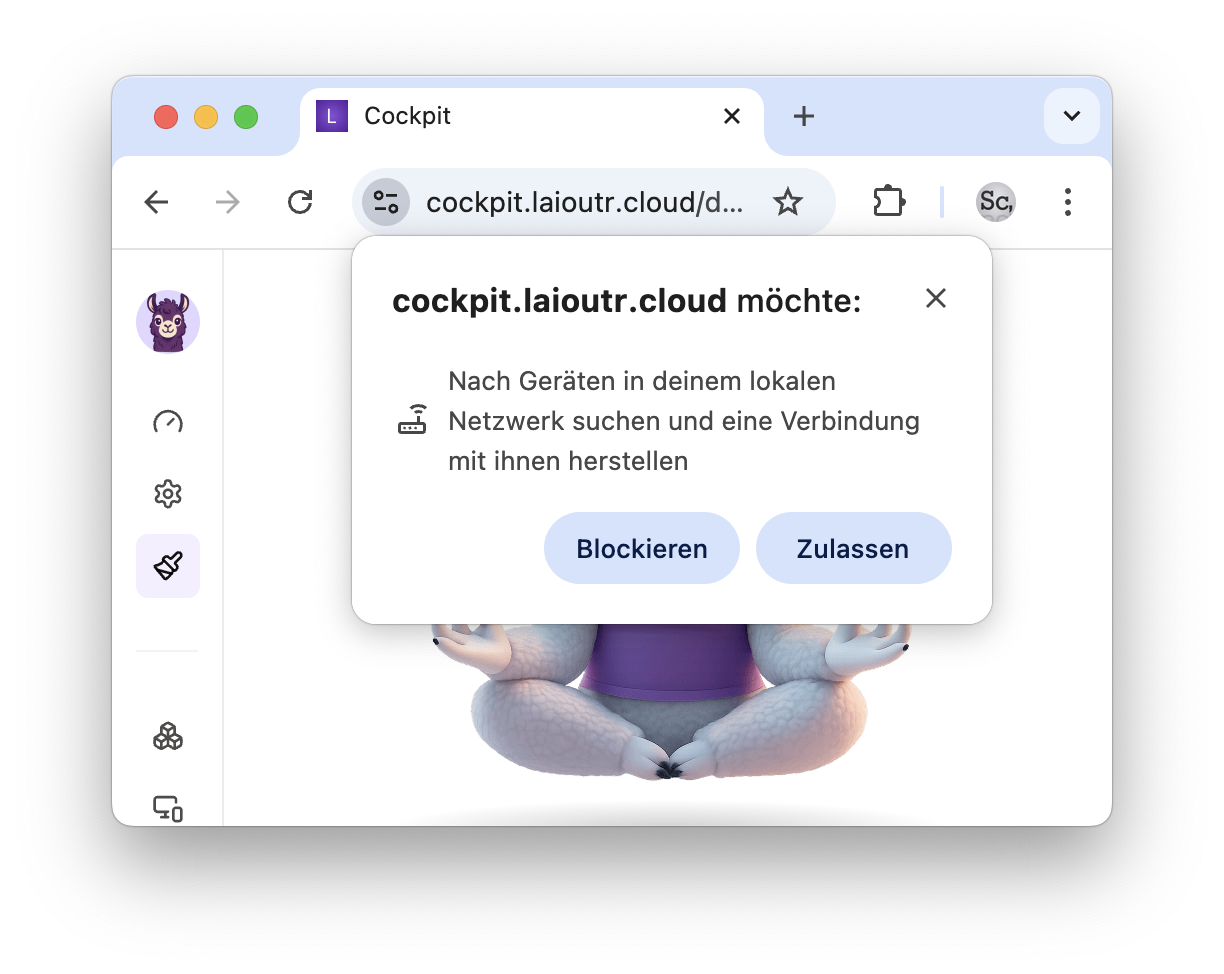 More information is available on the Chrome blog.
Development
With your environment running, you are ready to build. The most important difference between a regular Nuxt module and a Laioutr app is the registerLaioutrApp call in your module.ts file. This is how you register Laioutr-specific functionality.
Adding UI sections and blocks
Register section and block directories in your module.ts:
await registerLaioutrApp({
  /** ... */
  sections: [resolve('runtime/app/sections')],
  blocks: [resolve('runtime/app/blocks')],
});
This scans and registers all section and block Vue files in those folders. Each component needs a definition export so Studio and Frontend Core know how to render and configure it. See App Configuration for details on definitions and config keys.
Adding Orchestr integrations
Orchestr integrations let you connect external services (commerce, CMS, search) to your frontend through a unified API layer.
Register your Orchestr directory in module.ts:
await registerLaioutrApp({
  /** ... */
  orchestrDirs: [resolve('runtime/server/orchestr')],
});
This watches the Orchestr folder for changes and automatically restarts the server when a file is modified.
Troubleshooting
ERR_PNPM_FETCH_403
This means pnpm cannot authenticate with the Laioutr package registry. Your .npmrc file is either missing or the NPM_LAIOUTR_TOKEN placeholder was not replaced with your actual token. Open .npmrc and verify the token value matches what you see in project settings.
unexpected end of JSON input
Your laioutrrc.json file is corrupted or incomplete. Delete it and re-fetch:
rm laioutrrc.json
laioutr rc fetch -p <organization-slug>/<project-slug> -s <project-secret>
command not found: laioutr
The Laioutr CLI is not installed. Install it globally:
pnpm add -g @laioutr/cli@latest
See the CLI documentation for more details.
Dev server won't start
Check your Node.js version. Laioutr requires Node.js >= 22.12:
node --version
If you are on an older version, update Node.js before trying again. Also make sure you have run pnpm install successfully (no errors in the output) before starting the dev server.